Recent Posts

Showing posts with label cool blogging. Show all posts

Sunday, July 3, 2011

New high quality keywords revealed for this month


Hello, all the bloggers i know that you have to enter the things in the blog which are to be read: So, here are the keywords you would  never forget. To be a successful blogger all you need to do is to post about the topic which is in fashion these days. And for that purpose you need to target the main keywords in the market. You have to be a very updated blogger to be different from others and even better than others. We hope you will agree and show these keywords in your posts. And for this purpose we are providing you with these already given keywords which will surely benefit you (No matter you have a wordpress blog or blogger blog):

  • For adsense related topics:
  1. Adsense CPM increasing tricks
  2. Adsense approval tricks
  3. Adsense CTR increasing tricks
  4. Why is there 'Ads by Adchoices' and not 'Ads by Google'.
  5. How to get your blog approved for adsense.
  • For gadgets related news:
  1. Newest releases in the technology world.
  2. Releases by Sony.
  3. When is the Next android version coming.
  • For blogging related topics:
  1. How to add a favicon to your blog?
  2. How to increase your blog's traffic/rating?
  3. How to earn money online thru your blog?
  • Others:
  1. How to hack a facebook account?
  2. How to hack a Gmail account?
  3. How to make a download link for your blog?

Thanks for reading friend's we are hoping to get a feedback for your problems.  Keep coming back to us and enjoy blogging.

Monday, June 27, 2011

How to blog from your mobile?

Hey, friend's .
This is another post for your reference.

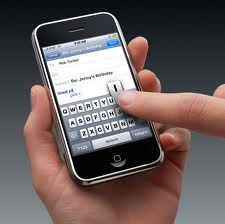
 This is dedicated to a position where you aren't able to do blogging from a computer. Well, as you know blogging from mobile isn't so good (as typing from a mobile sucks). You may be really interested to know that this post is also written from a handset.

 You need to write from a mobile only when you don't want to let your blog's ranking till you enjoy your vacations outdoors (and you don't have a laptop of course), So, here are the steps :

 1. First your handset should have web or gprs settings for usage of web.

2. Your browser should also have javascript console (you will know it's importance if you don't have one ).

 3. Now having all these will help you use these steps.

 4. Now open your browser and go to your blog dashboard and go to "new post".

 5. Don't forget to unmark the mobile view in your browser. (it's the most important trick ).

 6. Now write your post as normal and don't forget to use T9 dictionary (otherwise you will get your fingertips swelled).

7. Now you will have your blog updated.


 Keep coming and enjoy blogging. You can . . . . Twee t this post if you like. Best of luck :) .

Friday, May 27, 2011

SEO Tips for Blogger.

Hello, all the bloggers. As, I am also a blogger so I do understand how does SEO's affect your site's viewer's.
So, listen now all the search engines are like a helping hand to your blog. Now, It is your duty to understand its importance for SEO(Search Engine Optimisation) for your blog.

I am pretty sure if you follow these steps, You may surely get more Pageviews for your blog every second: 


  • Firstly, as you know You will have to Optimise your blog to Google, the largest used search engine. To do so i will suggest to keep using Google's Webmaster tools for your blog by simply using your Gmail ID.
  • Now, Even if your blog has been updated by the Webmaster tools, still you need to focus on the content you write.
  • The content you blog upon should be WORTH TO READ FOR. Or you can say, Your blog should have quality content. To keep you in the list of search results.
  • The DUPLICATE CONTENT is the most dreading threat to the blogs and therefore it can lead you nowhere but out of the search results or even your blog may be banned.
  • Your blog should be regularly updated. If not, then your blog's rankings will drop as hell.For ex.- your blog should have a new post once in a week at least.

Tuesday, May 24, 2011

How to add a slideshow in your blog?


Every blogger wants to make it's site more popular and to enhance it's looks.
We hope you also want to do so.
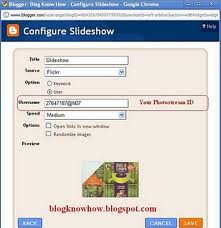
 So,to add a slideshow to your blog these are the shortsteps :
  1. Go to your blogger account.
  2. Open your dashboard.
  3. Go to design of your blog.
  4. Choose add a gadget.
  5. The last but not the least , choose add a slideshow widget.
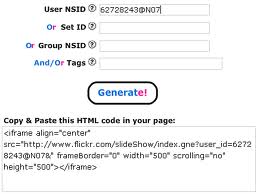
  6. Now choose your photo upload link such as Flickr, Picassa, etc.
  7. ZIf the slideshow is appearing, it will appear on the blog.
Thanks for reading, keep blogging.


Monday, May 16, 2011

Top 11 wordpress plugins for SEO.


Hello, all the wordpress users, now as you need. I am going to show you the way to some pretty cool Wordpress plugins for SEO:

    Although, these are very good but you may also get the best out of it in there. Hope you like them and also appreciate our blog. Thanks for reading and keep coming back

    Tuesday, May 10, 2011

    How to increase Adsense CTR?

    Adsense is the biggest and the largest provider of advertising in the admarket.


    Although  I  wasn't able to activate it for my web site, (You know the strict rules and everything).But, still i like to give you many important tips on the increasing of the CTR (Click Through Rate) of
     your website.         


    For this purpose you will have to learn that better placements make or produce better revenue which is also the first rule of advertising and gaining profits in the Admarket. So,  hereby i suggest that you should place them at places where you think the readers stay the most. This will shoot up your revenue by very much. I would just suggest you to place them in the sidebars and the Header's area. A very likely area would be the Blog's Post.


    Thanks for reading, I hope this will help you better in blogging.

    Thursday, April 28, 2011

    Easiest way to get the 'read more' tag for your blog post?

    For making the reading more option just folow the steps:

    • Type your post, just go to edit HTML.
    now type this text in the middle where you want the post to appear 
                                                                                <--more-->
    • You will surely see the tag appear.
    Thanks for reading bye bye!

    Thursday, March 31, 2011

    How to add pages widget to your blog?

    Hey all the bloggers, I know you need this post very urgent in front of you, that is why i am writitng this post for all the bloggers on the planet.

    So, to enable the pages widget you will have to limit the no. of posts in your blog's first page. You should have  the following features in your blog page.The required blog features are as follows:
    • Your blog may have the 'read more' tag added in it already. Even if you don't have it you should have read the adding ' read more' tag on the blog.
    • Still if you have any problem in the working of the blog tag or 'page tag'. You should try going in the posts option in the layout area of the blog design.
    • After that you may try limiting the no. of posts per page. If you are still not able to do that it means that your bought or 'borrowed' template doesn't allows you to do so that means that you have to choose the other option.
    • Now in the condition of templates , you should always remember to buy only the template that helps you by already having that feature.  Well nothing to worry because most of the posts already have taht feature.
    Hope, You enjoyed reading this blog.if you got any ideas write to us through comment's. We will be waiting for your answer.


    Enjoy reading and keep coming. Our new address itportals.co.cc

    Thursday, March 17, 2011

    How to get your blog on Google's first page.

    Google is the no. 1 site  on the net and so because it's search engine is the best one available yet.

    So it may get pretty hard to promote your blog through it. But if you follow the following blogging advices you may get it used for you.So ,  here are the needed steps :
    • Your blog should be according to GOOGLE'S RULES.The rule code says that your blog should have a nice image and repuation on the net.
    • Google's search rules are to count the links of the site thus making the better site available to the users.So, your site should have a nice no. of links on the net to be appearing for the search giant.
    • Google focuses on the Originality of the content. If you think that copying and pasting the content of the other site's may help you then it is absolutely wrong.If you have duplicate  content then not even one user may be available for your content.
    • The content should have Quality. Sorry, but it's true. Your content (what you blog) should be nice that the users should be able to come back for it.Actually, the internet was once a place where the professors used to share their research report. So, focus on getting the content of quality only for your blog.
    Thanks for reading the blog. We hope you like it. if you have any suggestions for us. Leave them in the comment box.We hope you use these options for good purpose only.
    Hope, You enjoyed reading this blog.if you got any ideas write to us through comment's. We will be waiting for your answer.


    Enjoy reading and keep coming. Our new address itportals.co.cc

    Tuesday, March 15, 2011

    Giveaway of the month- Widget box gadgets.

    Many times while using blogger.You may have recieved a help named as 'create your own gadgets or personalise your blog by adding widgets.But the biggest blast of happiness is that this website is very innovative for anyone who is a blogger.


    Now, you must be thinking that i am praising the site on the one hand and making it a give away of the month
    .The reason i am doing so is  that the websitedoen't really provide you with the stuff you are looking at .


    By the way i used it myself and also realised that it is good for making advertisement not blo gadgets or 'widgets' .
    This is the only thing i wanted to say so from now onwards don't use this site which instead of providing you with help but makes your blog a traffic producer for it.
    Thanks for reading and keep coming back to our blogs. I f you have any suggestions send them to our site as a comment.

    Hope, You enjoyed reading this blog.if you got any ideas write to us through comment's. We will be waiting for your answer.
    Enjoy reading and keep coming. Our new address itportals.co.cc


    Saturday, February 19, 2011

    Adsense too strict to publishers, other advert companies in place of adsense

    Hello there, I know everyone of your blogger are not satisfied with the adsense strictness to blogger.
    Even my site is not applicable to the google adsense policies .So, I therefore suggest you some other sites instead of google/adsense to help you out of the problem.To help you  out we suggest the followin sites:
    1. Chitika :Chitika is nowadays the first and best compeetetor of the google adsense.We suggest you to follow the link for that purpose and your wellness.The link for this site is www.chitika.com. When you will reach the home page just open the join now window and explore the world of e-commerce.
    2. Bidvertiser : Bidvertiser is even better than chitika it places a ad and even make the publishers bid for it.All the ads will be in your pre chosen format and thus how you like it. You may chose to have the image ads also.the link for this site is www.bidvertiser.com.We hope you enjoy this one also.
    3. Buysell ads :The buy sell ads is a sit that will accept your property as you  like it . It has very mild terms and conditions and it  will also keep you satisfied.You will never be regreted by this site.
    Hope, You enjoyed reading this blog.if you got any ideas write to us through comment's. We will be waiting for your answer.


    Enjoy reading and keep coming. Our new address itportals.co.cc


    Friday, February 18, 2011

    How to change the template of your blog?

    Many of the bloggers i have seen want to change the look of their template.So, they alway's want to have another template.They usually buy or rent a template to enhance their blog but sometimes they are not able to attach it properly and thus have a template but cannot attach it . So, here is the complete procedure of applying a template to your blog.Let's have a look at it:
    1. Firstly, when you buy or download a template from a site you will be able to read the procedure at the at the site of the template provider.But, if you forget to do so. Just calm down and follow the below steps.
    2. When you download a template it will be surely in the form of a compressed zip folder and you may know this thing better than me. 
    3. Now, you will have to extract the zipped folder in the other directory. When you would do so you will have to open it and check if there is a XML document.
    4. Now you should leave the folder immediately and go to your blogger account, go to your dashboard  and just click on the design of your blog which you want to change.
    5. Now click on the edit html option and you will have the template changing window of your blog.
    6. Now click on choose file, choose the upload option of the XML document.
    7. You may be asked to have the following widgets or clear all widgets. Choose keep widgets, click save.
    taddddda your blog's template has been changed.you will really enjoy the procedure.
    Hope, You enjoyed reading this blog.if you got any ideas write to us through comment's. We will be waiting for your answer.


    Enjoy reading and keep coming. Our new address itportals.co.cc

    Saturday, February 12, 2011

    Blogger banned in India,Canada, China and some other countries.How to survive.

    This is to inform the loyal readers of my blog that Blogger is banned in India,Canada, China.Oftenly, This may be a bad news for many bloggers.As it was for me in the past.
    I recognized it When i opened my blog at 10:30 P.M. yesterday. I was very upset for that reason when i recognized that many bloggers like me will be in great depression as i was.
    I thought that you all will also need my advice and the advice i needed. I am hereby imposing some steps that you would need to do to keep your blog running.
    Just follow these steps and you can make yourself satisfied.:

    1. As you would have known that even if the blogspot blog may not be opening but the website blogger.com is still continuing to be in use.Now first you will have to do is that open your blogger account in one tab and the unopened I.D. in thee other.
    2. Make a new web address with the sub-domain as .com, .co.cc, .org or etc.
    3. Now when you have made or have purchased your new web address, you may follow the upcoming very important steps.
    4. You may even purchase the new domain from the help of blogger also.
    5. After you have purchased the thing/sub-domain.
    6. go to your dashboard, open settings, open publishing.
    7. Click on advanced publishing, type the sub-domain you have chosen.
    8. Now type the correct captcha, type the redirect box.
    Now, you are finished with your blog's survival problems.We hope you are being helped with this steps. We will keep writing and helping you out. If you like the post please help us or give us further ideas for future blogging. Thanks and happy blogging.


    Keep coming to our site itportals.co.cc

     
    Design by Free Blogger tips | Bloggerized by A. K. Blogger - Premium Blogger Tips | Blogger Tips